

Remote work sounds like a dream—no daily commute, a cozy home setup, and the freedom to wear pajama bottoms during meetings. But let’s be honest: staying productive in this flexible environment comes with its own challenges. There are countless distractions, from noisy dogs and neighbors to the constant lure of social media. And let’s not forget the struggle to set boundaries when your beroom becomes your office.
Many remote workers find themselves battling decision fatigue—wondering whether to tackle emails, start a project first, or check their favorite celebrities’ newest Instagram post.. Some feel the lines between work and personal life blur so much that they answer work messages during dinner. It’s easy to feel overwhelmed, stuck in a cycle of doing too much yet never feeling like it’s enough.
The good news? With the right tools and habits, remote work can go from chaos to something that feels fulfilling and manageable. This post explores practical ways to boost productivity in 2024, helping remote workers like you and me, reclaim their time, energy, and focus—without adding more stress to their plate.
- Create a Dedicated Workspace

Creating a workspace doesn’t mean you need a full-blown office. A small desk tucked into a quiet corner can work wonders. Invest in essentials that promote comfort and productivity, like a supportive chair, good lighting, and perhaps a plant or two to liven up the space.
I’ll be honest with you. My desk is something I bought from the online marketplace for a very cheap price. I like it because the height is adjustable and it has wheels. If I want to move my position so that I can put my legs up on the bed, I can do it effortlessly. My husband, Lay also bought me a comfy office chair from a friend who got it from a rummage sale at a corporate office in Ortigas 😜.
I only have a pink desk cover my sister gave me as a Christmas gift, a laptop cooling desk and a pen holder. As long as I have my essential oils and those things organized, I’m fine. The goal isn’t perfection; it’s functionality.
Don’t forget boundaries. Let your family or housemates know that when you’re in your workspace, you’re in work mode. A simple “Do Not Disturb” sign can work magic in reducing interruptions. My family knows my work hours, and they know when not to go near me. Lol 😏
2. Master Time Management

Start by prioritizing your tasks. Whether it’s a trusty planner or a digital app, write down everything you need to accomplish for the day. Then, break these into manageable chunks. Tools like the Pomodoro Technique can help—work in focused 25-minute intervals followed by a short break. It’s surprisingly effective for staying on track and avoiding burnout.
Set boundaries for your time, just like you would with your workspace. Define your working hours and stick to them.
During my early days as an ESL tutor, my schedule was a bit chaotic, and I would often get stressed because I would forget to put my schedule on standby, resulting in penalties and missed opportunities. But now, I was able to optimize my schedule, and it’s been 3 straight months that my schedule is almost perfect 🙂 🙂
3. Optimize Internet and Tech Setup
Slow internet or outdated equipment can turn simple tasks into frustrating ordeals, wasting time and energy.
Start with your internet speed. If video calls are choppy or files take forever to upload, it’s time to upgrade. We’re subscribed to PLDT’s Fibr Unli Plan 1699

(Image downloaded from PLDT website)
I’m quite satisfied with the speed it’s giving me daily. It went above its promise of 300mbps! 👏👏👏 And in cases, when you experience a slow connection or a problem with service, a simple tweet to their official Twitter handle will do the job. I actually maintain my Twitter account solely for this purpose. Lol 😹😹
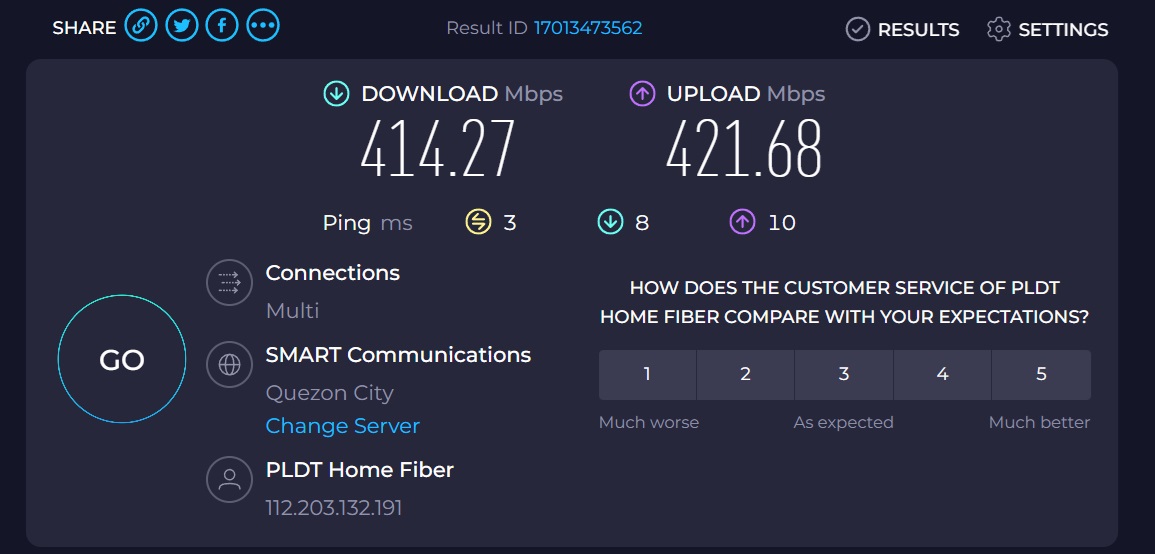
(Image: actual screenshot from speedtest.net)
Next, make sure your tech is up to the task. A glitchy laptop, a webcam that turns every meeting into a grainy mess, or headphones that broadcast your rooster’s antics to the world can throw off your workflow and leave a less-than-professional impression during calls or lessons. Consider essentials like noise-cancelling headphones for calls, a high-quality microphone, and an external monitor for a more comfortable setup. I bought my headphones from the Orange App , a Logitech H111. It’s a wired headset with noise-cancelling features.
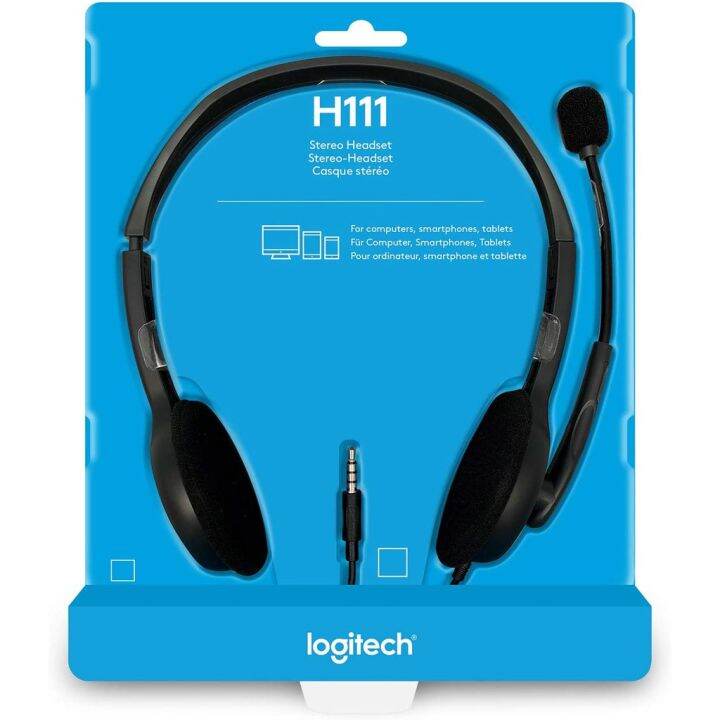
(Image downloaded from the web)
To prevent my laptop from overheating, I also have a laptop fan.

(Image downloaded from the web)
Recently, I bought a cute and comfy chair cushion with a backrest.

Don’t overlook software. Cloud-based tools and collaboration platforms like Google Workspace, Microsoft Teams, or Slack can streamline communication and file sharing. Keep your software updated to minimize bugs and ensure you’re using the latest features. Many companies provide this for their teams, so you don’t have to worry. Make the most of it and interact in the Watercooler group chat.
Cybersecurity is another must. Protect your data with strong passwords, enable two-factor authentication, and consider using a virtual private network (VPN). These small steps can safeguard your work and give you peace of mind. For VPN, I only use the free version of VeePN.
4. Eat Healthy Meals
When working from home, it’s tempting to grab whatever’s convenient, but living off snacks and takeout can sap your energy and focus—not to mention your wallet!
Start by planning your meals ahead of time. Prepping a few healthy options during the weekend can make weekday lunches hassle-free. Think simple but nourishing—salads with lean protein, grain bowls, or even hearty soups. This way, you’ll have something ready to go without disrupting your workflow.
Set specific meal times and stick to them. Taking a proper lunch break keeps hunger at bay and gives your mind a much-needed rest. I practice Intermittent Fasting, and I’ve been doing it for three years already. I take my brunch at 11 a.m. I prepare a bowl of oatmeal with dried or fresh fruits, cashews, and warm oat milk or almond milk. If I don’t feel like eating oatmeal, I prepare a bowl of rice with the ground pork dish I prepared during the weekend. Here’s a video of what I normally eat in the morning with shameless plugging. 😹😹
My Oatmeal breakfast #quakeroatmeal #healthybreakfast #fiberrich #h… | TikTok
5. Pamper Yourself
Pampering yourself doesn’t have to mean extravagant spa days (though they’re nice if you can swing it). Small acts of self-care can make a big difference in how you feel and perform.
Start by carving out time for yourself. Whether it’s a 10-minute meditation session, a relaxing bath, or reading a chapter of a good book, these moments help recharge your mental batteries. It’s all about finding what makes you feel refreshed and ready to take on the next challenge.
Create a ritual you look forward to. For me, it’s brewing my comforting cup of coffee with almond milk. These little indulgences can break up your day and give you something to smile about.
Investing in cozy slippers, a soft blanket, or even a scented candle. It can transform your home workspace into a calming retreat. Sometimes, the smallest changes in your environment can have the biggest impact on your mood.
Finally, remember to celebrate your wins, no matter how small. Have you finished a tough project? Treat yourself to your favorite snack or watch an episode of that show you love. These rewards remind you that your hard work matters and that it’s okay to pause and appreciate your efforts

Take Away
Remote work is filled with opportunities and challenges, but with the right approach, it can be both productive and fulfilling. Remember, small changes can lead to big results, and your productivity thrives when you do. Take these steps to make remote work not just manageable but enjoyable.
 From My Corner of the Couch